■症状
Outlookメニューから「古いアイテムの整理」を実行すると、
「実行しようとした操作が失敗しました。オブジェクトが見つかりませんでした。」とエラーが起きる。

■対策 ※Exchange(Microsoft365)限定の対処法かもしれません。
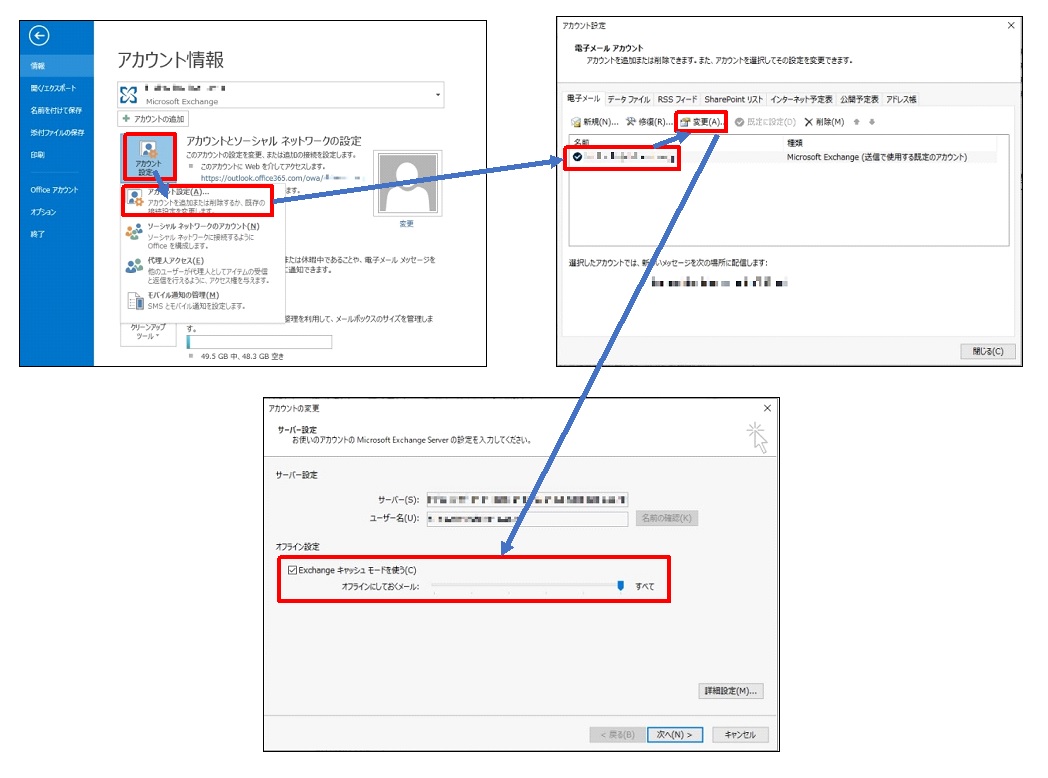
下図の通り、アカウント設定で「Exchangeキャッシュモードを使う」をオンにする。(チェックを付ける)
 ソフトウェア
■症状
Outlookメニューから「古いアイテムの整理」を実行すると、
「実行しようとした操作が失敗しました。オブジェクトが見つかりませんでした。」とエラーが起きる。
■対策 ※Exchange(Microsoft365)限定の対処法かもしれません。
下図の通り、アカウント設定で「Exchangeキャッシュモードを使う」をオンにする。(チェックを付ける)

